
How to mount a TV against the wall using a wall mount.
Choose the Right Wall Mount:
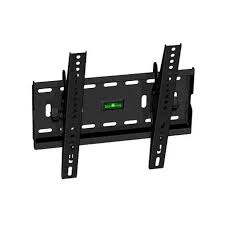
Select a wall mount that is compatible with the size and weight of your TV. Ensure that the mount is designed to support the VESA mounting pattern of your TV, which refers to the distance between the mounting holes on the back of the TV.
Locate Studs:
Use a stud finder to locate the studs in the wall where you want to mount the TV. Mounting the TV to studs provides the necessary support to hold its weight securely. Mark the center of each stud with a pencil.
Position the Mount:
Hold the wall mount against the wall at the desired height, ensuring that it is level. Use a pencil to mark the locations of the mounting holes on the wall through the holes in the mount.
Drill Pilot Holes:
Use a drill with a bit slightly smaller than the diameter of the mounting screws to drill pilot holes at the marked locations on the wall. This will make it easier to drive the screws into the studs and reduce the risk of damaging the wall.
Attach the Mount to the Wall:
Secure the wall mount to the wall using the appropriate screws and anchors, making sure to drive the screws into the studs for maximum stability. Use a level to ensure that the mount is still straight as you tighten the screws.
Attach the Mounting Brackets to the TV:
Locate the mounting holes on the back of the TV.
Attach the mounting brackets to the back of the TV using the provided screws, making sure they are securely fastened.
Mount the TV:
With the help of another person, lift the TV and carefully align the mounting brackets with the arms of the wall mount.
Once aligned, gently lower the TV onto the mount, ensuring that it is securely seated.
Secure the TV:
Use any provided locking mechanisms or safety screws to secure the TV to the mount, preventing accidental dislodging.
Cable Management:
Use cable ties or cable clips to organize and secure the cables behind the TV, keeping them neat and out of sight.
Test:
Ensure that the TV is securely mounted and stable. Test its tilt, swivel, or articulation if applicable to ensure it functions properly.
If you’re unsure about any step, don’t hesitate to contact us via +254706731791.
Other repair services you might also be interested in include:
Check other service on Pos system solutions