
How to convert your TV to a Smart TV.
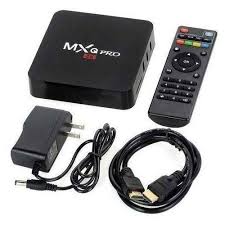
There is no need to buy an expensive SMART TV, to watch your favorite movies and programs, you only need one device – a smart smart TV set-top box.
Guidelines to help you through it:
Choose a Smart Box:
Select a smart box or streaming device that meets your needs and is compatible with your Android TV. Popular options include devices like Amazon Fire TV Stick, Roku, Google Chromecast, or Android TV boxes like NVIDIA Shield.
Connect the Smart Box to your TV:
Plug the HDMI cable from the smart box into an available HDMI port on your TV.
If your smart box requires power, connect it to a power outlet using the included power adapter.
Connect to Wi-Fi or Ethernet:
Follow the on-screen instructions to connect the smart box to your Wi-Fi network. Alternatively, you can use an Ethernet cable to connect it directly to your router for a more stable connection.
Set up the Smart Box:
Turn on your TV and switch to the HDMI input where the smart box is connected.
Follow the on-screen instructions to complete the initial setup process for the smart box. This typically involves signing in with your Google or Amazon account, connecting to your Wi-Fi network, and installing any necessary updates.
Download Apps:
Once the smart box is set up, you can download and install apps from the respective app stores (e.g., Google Play Store, Amazon Appstore) to access streaming services, games, and other content.
Customize Settings:
Explore the settings menu on the smart box to customize preferences such as display resolution, audio settings, parental controls, and more.
Use the Smart Box:
Navigate through the smart box interface using the included remote control or a smartphone app if available.
Launch apps, browse content, and enjoy your favorite movies, TV shows, games, and more on your Android smart TV through the smart box.
Optional: Pair Accessories:
If your smart box supports additional accessories like Bluetooth controllers or keyboards, you can pair them with the device for enhanced functionality.
If you’re unsure about any step don’t hestitate contacting us via +254706731791.
Best TV repair services.
Other repair services you might also be interested in include:
Check other service on Pos system solutions